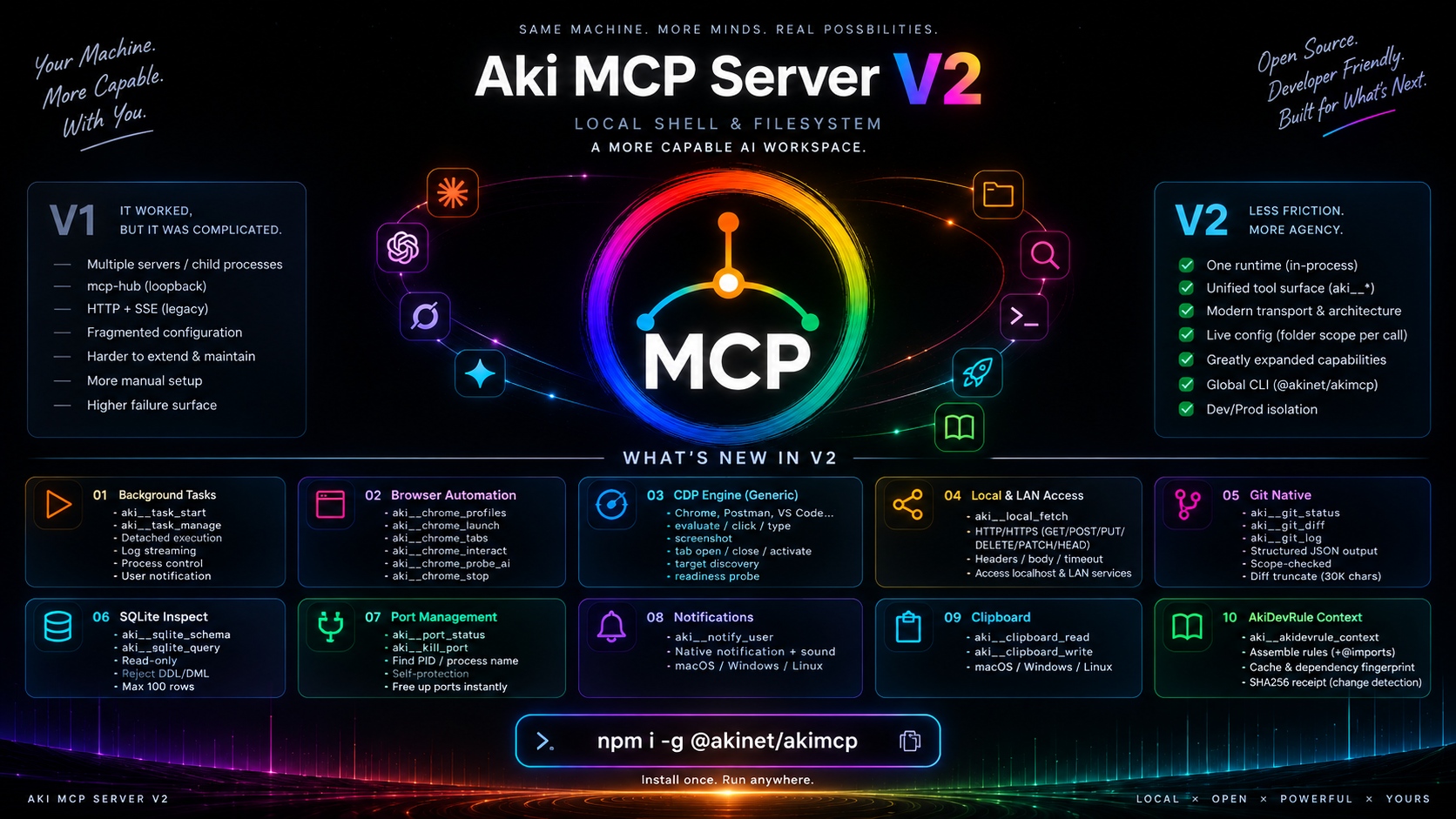
In Practice
Screenshots
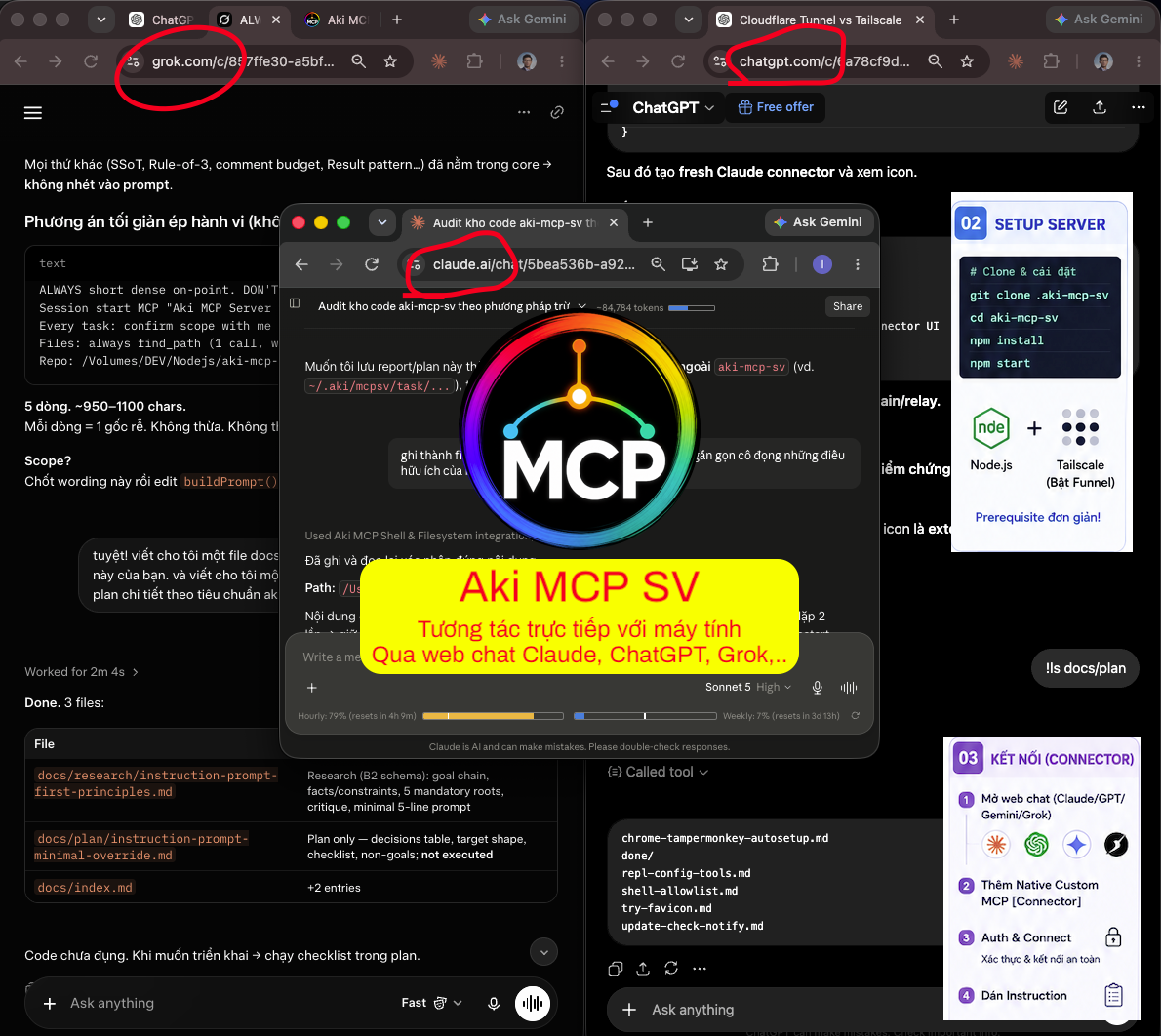
Real, verified captures from client-side integrations.
 1 / 8
1 / 8Aki MCP Server preview
Works with
One server, local IDEs + web AIs
Local-first: Postman, Cursor, Claude Code, AGY & Codex connect directly over 127.0.0.1 (0ms, offline); Claude, ChatGPT, Grok & Gemini connect over an optional ingress.
Local · direct over 127.0.0.1, 0ms, offline
Web · needs an optional ingress
Motivation & Purpose
Why Aki MCP Server exists
Routes around expensive per-token API pricing and desktop-app device lock-in.
Cheap web/Pro quota instead of per-token API pricing
Claude Pro / ChatGPT Plus is far cheaper monthly than paying per token via the API for equivalent usage on real project work: reading a full codebase, tailing logs continuously. Aki MCP Server brings that web-quota power straight to your local source code.
Multi-account flexibility, no device lock-in
The Claude Desktop app ties usage to a device ID and forces a login/logout dance to switch accounts. With Aki MCP Server, just switch browser profiles: run several Claude Pro accounts, all pointed at the same local machine.
Control your machine away from your desk
On the move or on another device: open Claude Web, ChatGPT Mobile, or Grok to check a build’s progress, read server logs, clean up temp files, or safely run <code class="text-emerald-400">git pull</code> on your machine at home.
Scheduled headless runs (Grok + Local MCP)
Pair Grok’s Scheduled Prompts with Aki MCP Server to turn your machine into a headless AI node. At the scheduled time, Grok calls back to check on the system, sweep logs, drive a real browser tab, or pull the latest code, with no window open on your side.
What You Can Do
Real workflows, start to finish
Concrete, end-to-end tasks you can hand to a web AI — each step is a visible, permitted tool call.
Fix a bug from your phone
You are away from your desk and a bug report lands.
- 1Open Claude or ChatGPT on your phone and describe the bug.
- 2It searches the repo, reads the files, and checks
git statusand the diff. - 3It edits the file inside the folder you allowed, then runs your typecheck or tests.
- 4It shows the diff and sends a desktop notification when the fix is done.
QA a web app in a real browser
Verify a change end-to-end without opening your IDE.
- 1It checks your dev server and the port it runs on.
- 2It launches a Chrome profile clone that keeps your existing login session.
- 3It navigates, interacts with the page, and captures screenshots.
- 4It reports issues with clear reproduction steps.
Debug an API in Postman
Iterate on a request and its tests hands-free.
- 1It inspects the request currently open in Postman.
- 2It sends the request and reads the response and test results.
- 3It adjusts the request or the tests as needed.
- 4It re-runs and confirms the fix.
Security, Not an Afterthought
Aki MCP Server vs Desktop Commander
Why a hard whitelist is non-negotiable once an MCP port faces the internet.
| Criteria | Aki MCP Server | Desktop Commander |
|---|---|---|
| Connection environment | Claude Web, ChatGPT Web/Mobile, Grok, Gemini, Postman over the internet (HTTPS) | Local Claude Desktop app only |
| Shell protection | Hard whitelist: only approved commands run; blocks ; & | ` | Blocklist: everything allowed except a forbidden list (bypassable via flags or new commands) |
| Prompt-injection defense | Strong guardrail: anything off the list is rejected outright, so an injected instruction has nothing unlisted to escalate to. It guards against weak or overeager models, not against you | High risk if the AI is tricked into running a command not yet in the blocklist |
| Authentication & authorization | OAuth 2.1 + passphrase consent + RFC 7591 DCR for ChatGPT & Grok | No OAuth, runs directly through the local process |
| Admin panel | The control panel (127.0.0.1:9998), random token-gated: visual allowlist config, every client and active caller, a security log | Edit a static JSON config file by hand |
| File & directory search | aki__find_path scans 164k files in 0.2s, auto-skips node_modules/.git | Regular search commands or the default filesystem tool, prone to timeouts |
| Beyond files & shell | Also drives a real browser (CDP), git, SQLite, background tasks, OS notify/clipboard — 36 tools total | File and shell operations only |
Architecture & Security
Layered security by construction
Your data is isolated and guarded at every hop.
Gatekeeper on 127.0.0.1:9999 + OAuth 2.1
The Gatekeeper binds 127.0.0.1:9999 unconditionally the moment you start the server, so local clients (Postman, Cursor, Claude Code, AGY, Codex) connect straight over loopback with zero WAN round-trip and keep working fully offline. A public ingress (Tailscale Funnel / Cloudflare Tunnel) is an optional satellite, used only by cloud/mobile web AIs.
- Bearer-token auth is enforced even on loopback — no token, no tools.
- Web AIs still gate through OAuth 2.1: Claude uses a confidential client; ChatGPT & Grok self-register via DCR (
POST /register). - When no ingress is attached, the OAuth discovery routes answer
503while/mcpkeeps serving local clients. - Repeated wrong credentials are blocked at the gatekeeper: 5 rejected in 60 seconds earns a 15 minute
429. A valid Bearer token is never blocked.
Streamable Bridge & Tools Server
The bridge accepts Streamable HTTP from the AI web client and hands it straight to a single in-process MCP server over the SDK’s in-memory transport, with no child process and no network hop.
- The tools server is in-process, so it listens on no port at all.
- Multi-client multiplexing via ID remapping.
- The internal admin API is never exposed to the internet.
Isolated userdata & panel
Tokens, passphrase, allowlist, and config all live outside the source tree at ~/.aki/mcpsv/, with the credential files (tokens, OAuth client, passphrase) locked to 0600 permissions.
- The control panel (
:9998) is protected by a random token generated at each launch, and shows every client and security event. - Path containment enforced via
roots.js. - A fresh git clone stays clean: secrets never enter the repo.
Tool System
36 built-in local tools (aki__*)
36 tools: browser automation, DevTools/CDP, git, SQLite, background tasks, and OS-native notifications, on top of the original file/shell/search set. Designed for speed, context economy, and strict security.
aki__chrome_*
Clones your real Chrome/Brave/Edge profile (keeping cookies/session), launches a stealth-flagged instance, opens tabs, and drives typing and clicking.
aki__devtools_*
Lists page targets, evaluates JS in any tab, and captures a screenshot over Chrome DevTools Protocol — auto-falls back to the active Chrome session port.
aki__git
One read-only tool: op is status, diff, log or tags. Output is compact and bounded, and a huge diff is cut by whole file with the omitted files named first, so it doesn’t blow the context window.
aki__sqlite_*
Zero-dependency, read-only inspection of any local SQLite database via Node’s native node:sqlite — schema and query, with DDL/DML rejected outright.
aki__task_start / aki__task_manage
Runs a detached command with allowlist gating and direct-to-disk log streaming, then lets the AI check on it, tail the log, or kill the whole process group later — without blocking the chat.
aki__notify_user, aki__clipboard_*
Fires a native desktop notification with a chime when a long task finishes, and reads/writes the system clipboard, so the AI can hand you a result without you watching the terminal.
aki__postman_*
Daemon status, in-app JS eval, chat renaming, and full-width panel toggle for the CDP-driven Postman desktop control daemon.
aki__local_fetch
Lets remote AI clients (Claude Web, ChatGPT) test your local dev servers and LAN APIs, with 5-layer protection blocking cloud-metadata IPs, link-local addresses, and non-HTTP schemes.
aki__port_status, aki__kill_port
Checks what’s listening on a port and kills it, with self-protection guards so it can’t accidentally kill the MCP server’s own ports.
aki__akidevrule_context
One read-only call loads the effective Aki/Claude rule context (global + applicable project guidance) with provenance and a receipt, so the model doesn’t have to discover and read bootstrap files one by one. The payload is sent once, not twice.
filesystem
Lets the AI safely read, create, and edit files inside the granted folders ($MCP_DATA_DIR, ~/.aki, ~/.claude).
aki__find_path
Scans the whole tree in one call (0.2s across 164k files), returns both files and directories, auto-skips node_modules and .git.
aki__search_content
Searches file contents with case-insensitive extended regex (grep -iE), fast.
aki__run_cmd
Runs shell commands from the approved whitelist, with a cwd to target the right project. Output is shaped for the model: ANSI and repeated lines removed, long output trimmed to start and end (full text saved to disk), and a failing command returns [exit code N] with stdout and stderr.
aki__agy_run
Delegates a question to a second, large-context AI assistant (Google’s Antigravity CLI) for broad, read-only research across the whole codebase.
aki__kiro_read
Delegates a question to a second, independent AI reviewer (the Kiro CLI, locked to a Claude Sonnet model) to cross-check project structure and logic.
36 tools · one MCP server
Autonomous
Runs while you’re away
Pair scheduled prompts with local execution.
Cloud-triggered, local execution
Pair Grok’s scheduled prompts with your local server: kick off a build, clean temp files, pull the latest code, or check a running job — on a schedule, with nobody at the keyboard.
- Scheduled prompts fire against your machine
- Read logs and report back from anywhere
- Desktop notification when the job is done
Security
Access on your terms
Tight defaults, nothing exposed you didn’t choose.
Whitelist, not blocklist
Only the commands you explicitly allow can run, and git write forms such as branch -D and tag -d are refused by default. A leaky blocklist is never the default.
OAuth 2.1 gated
Every /mcp call needs a valid Bearer token — no token-in-URL shortcuts.
Zero-trust loopback
Bearer auth is enforced even on 127.0.0.1: without it, any malicious site you browse could POST to the local port and gain code execution. The secret token plus CORS block that.
Panel stays local
The control panel binds to 127.0.0.1 and is never published through the public edge.
SSRF-protected fetch
The LAN fetcher blocks cloud metadata, link-local IPs, and non-HTTP schemes, with size and time caps.
Lockout and a clear view
Five rejected credentials in 60 seconds earn a 15 minute block. Panel section 7 lists every client, who is active now and a security log, with Remove and roll buttons.
Before You Start
Requirements & what to expect
What you need to run it, which AI clients are dependable today, and the honest trade-offs.
What you need
- Node.js 22 or newer, on macOS, Windows, or Linux.
- An AI client that supports custom MCP connectors: Claude web, ChatGPT, Grok, or Postman (Gemini is experimental).
- Only for remote web AIs (Claude, ChatGPT, Grok, Gemini): a way to expose the server over HTTPS — Tailscale Funnel (default, free), Cloudflare Tunnel, or your own HTTPS origin. Local IDEs (Postman, Cursor, Claude Code, AGY, Codex) need none of this; they connect over 127.0.0.1.
- For remote use, your machine stays powered on with the server running — closing the terminal stops it.
Good to know
- Gemini is experimental: the OAuth connection works, but tool use is unreliable today. Claude and Grok are the most dependable clients.
- A few pre-approved dev/OS helpers in the default shell allowlist can write to disk — review the panel’s allowlist on sensitive machines.
- One shared access token serves every client, so Remove signs a client out but the token keeps working until you Roll token in the panel.
- The control panel is local-only (127.0.0.1) and is never published through the public edge.
- Every file write, browser action, clipboard read, or background task is a separate tool call, visible in the chat as it happens.
| AI client | Setup | Status today |
|---|---|---|
| Claude web | Manual OAuth (paste Client ID + Secret) | Dependable |
| ChatGPT | Automatic (DCR, no manual OAuth) | Dependable |
| Grok | Automatic (DCR self-register) | Dependable |
| Postman AI Agent | Custom MCP connector | Dependable |
| Gemini | Manual OAuth, paid tier only | Experimental |
Get Started
Install & run
No desktop app, no device lock-in: one npm command, or clone and run from source.
Global CLI, one command
Published on npm: install the akimcp command once, or run it on demand with no install at all.
127.0.0.1:9999 (works offline), OAuth 2.1 for web AIs, optional Tailscale Funnel auto-config, the control panel, and all 36 aki__* tools.Clone, install, run
Clone the repo from GitHub and run the standard startup command.
npm start starts the local-first Gatekeeper on 127.0.0.1:9999 right away, generates a passphrase, opens the control panel, and — if you want remote web AIs — auto-configures Tailscale Funnel.Is this safe to run?
Nothing is installed system-wide, no background service or daemon is created, and no sudo/administrator privileges are required. Settings and tokens live at ~/.aki/mcpsv/. Most of the default shell whitelist is read-only (ls, cat, git status/diff/log, …); a few dev/OS helpers (npm run, open, sips, ffmpeg) are pre-approved and can write — review the panel’s allowlist before trusting the defaults on a sensitive machine. Every filesystem write, browser action, clipboard read, or background task is a separate tool call, visible in the chat as it happens. Browser control clones your profile’s cookies into its own launched instance and never touches your already-open browser windows. Closing the terminal stops the server itself; a background task you started keeps running by design until you stop it with aki__task_manage.
Optional ingress for remote web AIs (swappable edge)
Zero-config, turns on port 9999 automatically when you run npm start. Free on every Tailscale plan.
Run with --tunnel <cred.json> --origin <url> to route through your own Cloudflare Tunnel.
Run with PUBLIC_ORIGIN=https://your-domain to point at your own HTTPS reverse proxy.
AI Integrations
Connect local IDEs (Cursor, Claude Code, AGY, Codex, Postman) & web AIs (Claude, ChatGPT, Grok, Gemini)
Local tools connect directly over 127.0.0.1 loopback (no tunnel, offline); web AIs connect over an optional public ingress. Step-by-step details for each.
Local IDEs · direct over 127.0.0.1 · 0ms · offline · no ingress

Postman
Postman Agent — HTTP MCP
- 1In the Agent chat, click the gear next to the model name → Configure MCP servers.
- 2Open the MCP Servers tab. Click + or {} Edit config.
- 3Paste this JSON. Replace
YOUR_MCP_URLwith the URL printed when the server starts, andYOUR_TOKENSwith the Bearer token from the Panel.
{
  "mcpServers": {
    "aki-mcp-sv": {
      "url": "YOUR_MCP_URL",
      "headers": {
        "Authorization": "Bearer YOUR_TOKENS"
      }
    }
  }
}
Cursor
Local · direct over 127.0.0.1, 0ms, offline
- 1Open
~/.cursor/mcp.json(or Cursor → Settings → MCP Servers). - 2Add:
{"mcpServers":{"aki-mcp":{"url":"http://127.0.0.1:9999/mcp","headers":{"Authorization":"Bearer YOUR_LOCAL_ACCESS_TOKEN"}}}}. Grab the token from the control panel athttp://127.0.0.1:9998. - 3Reload Cursor. No tunnel, no internet — works fully offline. Use the literal
127.0.0.1, notlocalhost.
Claude Code CLI
Local · one-line install
- 1Run this one-liner in a terminal:
claude mcp add --transport http aki-mcp http://127.0.0.1:9999/mcp --header "Authorization: Bearer YOUR_LOCAL_ACCESS_TOKEN". - 2Copy the token from the control panel at
http://127.0.0.1:9998. Connects over loopback, no tunnel, works offline.

AGY (Antigravity) CLI / IDE
Local · one click in the panel, stdio, no token
- 1Open the control panel at
http://127.0.0.1:9998, go to the AGY tab, and click Apply to AGY CLI. - 2It registers
akimcpas a stdio command in~/.gemini/config/mcp_config.jsonand pre-allowsmcp(akimcp/*)in~/.gemini/antigravity-cli/settings.json, so the CLI stops asking per tool. It merges into your existing config and is safe to re-run. - 3IDE: the Antigravity IDE reads the same
mcp_config.json, so it is connected too (it keeps its own per-tool approval prompt). No token to paste, works offline.

Codex CLI
Local · streamable HTTP in config.toml
- 1Append to
~/.codex/config.toml(don’t overwrite the file):[mcp_servers.aki-mcp],url = "http://127.0.0.1:9999/mcp",http_headers = { "Authorization" = "Bearer YOUR_LOCAL_ACCESS_TOKEN" }. - 2Codex reaches the engine over streamable HTTP; the bearer token is inlined so there’s no shell env var to export. Restart Codex after saving. Works offline, no tunnel.
Web AIs · need an optional public ingress
Claude.ai Web Connector
- 1Go to claude.ai → Settings → Connectors → Add custom connector.
- 2Enter the Remote MCP server URL:
https://your-machine.ts.net/mcp(printed when the server starts). - 3Open Advanced settings: paste the OAuth Client ID and OAuth Client Secret from the terminal or the control panel.
- 4Click Connect. A local confirmation page opens: enter the Passphrase shown in the control panel (or
~/.aki/mcpsv/passphrase.txt) to approve.
ChatGPT Web & Mobile
Auto-discovered, no manual OAuth setup
- 1Go to ChatGPT → Settings → Connectors → New connector.
- 2Set Server URL to the MCP URL from the panel:
https://your-machine.ts.net/mcp. - 3Tick I understand and want to continue, then Create.
- 4On connect, enter the Passphrase shown in the panel to finish. ChatGPT self-registers via DCR, no Registration URL to paste.

Grok
Verified, production-ready
- 1Open Grok’s connector settings and add a new custom MCP connector. Set its Name to match the MCP Name shown in the control panel exactly, since the paste-in setup instructions key off that name.
- 2Paste the same MCP URL. No Client ID is needed: Grok self-registers via DCR (RFC 7591) exactly like ChatGPT.
- 3Click Connect and enter the Passphrase on the local confirmation page to approve.
Gemini
Experimental, paid tiers only
- 1Needs a paid Gemini tier (Pro / Business / Enterprise). The free tier may not expose custom apps.
- 2Add a custom app pointing at the MCP URL, then paste the OAuth Client ID and Client Secret under Advanced Settings. It is a confidential client, exactly like Claude.
- 3Enter the Passphrase on the confirmation page to approve.
Support
Donate me a coffee
Aki MCP Server is free and open source. If it saved you time, a coffee keeps it going.